The Web's future: a $0.22 piece of felt

I was diagnosed with tendinitis in my left thumb three weeks ago.  My doctor fitted me with a stylish black brace that keeps me from moving my thumb.  The wrist brace isn't too bad.  I can still type very well -- almost as fast as usual, since the left thumb doesn't do a whole lot on a keyboard.  But my main annoyance is the Velcro on the brace.

As you can see in these pictures, the manufacturer decided to sew one long strip of Velcro (the scratchy kind, not the soft kind) onto the length of the brace, where the three straps connect.  But the Velcro area is bigger than it needs to be, so there's lots of exposed "scratchy" Velcro to catch onto other things.  I keep getting my hand stuck to my sweaters!  It's already caused minor damage to a couple pieces of my clothing.  So to solve this problem, my wife and I stopped at Wal-Mart to buy a piece of black felt.  $0.22 out the door, tax included -- quite possibly the cheapest Wal-Mart trip ever!  This little add-on to cover up the excess Velcro should keep it from snagging.

As I was reading my friend Nate Riggs' post about the prospects of a Web 2.0 crash, as well as the Seth Godin post he links to about oversaturation, it made me think about how my $0.22 piece of black felt relates to the Web's future:
  • Content is like my brace's Velcro.  The right amount is wonderful, but having too much is simply annoying.
  • Web 2.0 has made everyone publishers.  From Facebook to Twitter to YouTube, an enormous amount of information is being churned out every minute by so many people.  The more content that's added, the harder it becomes to separate the wheat from the chaff.  Having too much Velcro on your brace (too much content to digest) gets your hand stuck to your sweater (paralyzed with too much information).

  • The future of Web 2.0 will come from filtering all this information.  Too overwhelmed with thousands of unread items in their RSS feeds, the next generation of Web visionaries will find a way to filter this information to make it more manageable.  If today's social media is Web 2.0, this filtered subset of information will be Web 2.1.  It will be equivalent to a piece of felt being placed over the excess Velcro on my brace.  The "filters" of Web 2.1 will hide the information that isn't adding value for that particular end user -- just like the felt is covering up the excess Velcro.
Social media is here to stay.  It'll evolve, and it might even face some setbacks as people struggle with how to deal with too much information, and as companies like Facebook and Twitter try to put profitable business models in place.  But once the right filters are in place, the trait that made Web 2.0 a success to begin with -- giving everyone the ability to be a publisher -- will sustain it for the long term.

How NOT to promote your webinar through banner ads or e-newsletters

When you're trying to generate a lead through a webcast, make sure your initial offer isn't too intimidating.  Many companies buy web ads or e-newsletter ads to directly promote a webcast, which I believe can be a big mistake that causes your campaign performance to take a hit.

Here at IndustryWeek, I get to see the click-through rates of many different types of advertising campaigns.  And over the years, I've consistently seen the click-through rates for webcast-specific ad campaigns getting worse and worse -- to the point where they're now lagging far behind other non-webcast ads.  So for the typical non-webcast campaign from XYZ Company, where they might see a click-through rate of 0.8% (just making up numbers here), the click-through rate falls to 0.2% or 0.3% when they run a campaign promoting a webcast.  This is a pretty consistent occurrence across most campaigns.

I think these results are due to the time commitment involved.  Asking a brand new prospect to give up an hour of their time to attend a webcast is a large commitment to communicate in a small ad, and that's why the ads often generate such a weak click-through rate and response.

For a campaign of this type, I'd recommend trying a different approach.  Develop an intermediate offer to promote in the web ad or e-newsletter ad, then offer the webcast later.  For example, offer a free research report within the ad.  Once the prospect has clicked on your ad and responded to that low-commitment offer, then you can invite them to your webcast.

Your ad click-through-rates will increase dramatically.  And while adding an intermediate step into the process sounds counter-intuitive, with this tactic you should see an increase in overall registrations -- because you're bringing more people into the first stage of the marketing funnel.

Last chance to sign up: "Webinars as Part of a Digital Marketing Strategy"

Edited 1/5/09:  Here's a link to the archive of this webinar, which you can view for free on Adobe.com


Don't forget to sign up for Adobe's event on webcast marketing, featuring me as one of the presenters.  You only have a few more hours -- it takes place later today! 

Wednesday, December 17, 2008
1:00 P.M. EST / 10:00 A.M. PST
Ken Molay, president of Webinar Success, and Michael Madej, General Manager of eMedia Sales & Marketing at IndustryWeek, present how web seminars can help you make your overall marketing strategy more effective and productive. Learn the right way to include web conferencing in your marketing mix, with an emphasis on integrating different digital marketing channels.

Electronic orientation for new names on your list

How many times have you heard someone say, "I didn't know that about your company!" or "I didn't realize you offered that product or service!"?  For as many times as you hear it, you can safely assume dozens of other people might feel the same way, but they just haven't vocalized it to you.  That can add up to a lot of missed opportunities!

Here's a simple but effective way to welcome new people to your email list, and get them up to speed on some of your most essential offerings:  Do a series of "electronic orientation" emails.

It's pretty typical for companies to send a confirmation email as soon as you've signed up for their list.  But how many companies follow up with regularly-timed additional messages, specifically crafted for new people on the list?  You probably should.

This is a great example of one message in a series of welcoming emails I received from MarketingProfs.  After signing up for one of their enewsletters, I received one of these emails per week for the next four weeks.  Note how they quickly and simply highlight a number of their different offerings I might be interested in.


You can't see this in the screenshot I've included here, but at the bottom of the message, there's a way to opt out of these "new member emails" without opting out of the list I signed up for.  That's important, since even though most people will be interested in learning more about your company's offerings, there might be some who only want what they've requested.  By offering a separate unsubscribe, you respect the user's preferences without endangering the new subscription you've picked up.

This idea seems so simple -- and that's because it is.  But how many companies are using this type of welcoming email tactic?  Not many.  And I don't understand why not, because the best time to engage a new member to your list is within the first month after they sign up!

A webcast on webcast marketing: Featuring a presentation by yours truly

Edited 1/5/09:  Here's a link to the archive of this webinar, which you can view for free on Adobe.com
 
I've been invited by Adobe and by Ken Molay of Webinar Success to speak on a webcast on Dec. 17.  It's part of Adobe's "Luminary eSeminar Series."  Here's the full description:
Webinars as Part of a Digital Marketing Strategy
Wednesday, December 17
1:00pm Eastern / 10:00am Pacific
Duration: 1 hour
Cost: None

Web seminars (webinars) are being used more and more to generate sales leads, stimulate awareness and interest, or impart information to prospects. Unfortunately, many companies view webinars as a stand-alone activity, divorced from other marketing activities. You can improve your marketing results by integrating webinars into an overall digital marketing strategy that includes email, banner advertising, search optimization, and other activities.

This seminar gives you valuable information on how to attract prospects to your company’s products and services by using webinars in a multi-channel eMarketing strategy. You will learn best practices for making sure that webinars and other digital marketing approaches support and reinforce each other. Find out how to target the right audience with webinar marketing that gets results.

You will get the benefit of two industry experts sharing their complementary areas of expertise. Michael Madej is the General Manager of eMedia Sales & Marketing for IndustryWeek. Michael will share his knowledge of how to build and manage a comprehensive digital marketing strategy that includes webinars.  Ken Molay, president of Webinar Success, gives you additional tips on how to make your marketing and lead generation web seminars more productive.

The one-hour seminar includes time for an interactive question and answer session with both speakers. The information is appropriate for all business marketers using or considering webinars as part of their campaign strategy.

You will learn:
  1. Strategies for promoting and marketing webinars
  2. How to use webinars to reinforce digital marketing campaigns
  3. Common mistakes in lead generation webinars
  4. Intelligent campaign add-ons that maximize the reach of your webinar

Which of these two companies would you rather do business with?

Compare and contrast these two approaches for dealing with potential customers who are using your site for the first time:

Approach A:

I ordered my Christmas cards from VistaPrint last week.  While I was filling out their new user form, they had two privacy checkboxes.  The first asked me if I wanted to get promotions from VistaPrint, and the second asked about making my email address available to other reputable organizations.  The first box was pre-checked.

But as soon as I un-checked that first box, an interesting thing happened.  They added a third privacy question underneath, and its box was pre-checked!  (Click here to see animated screenshots of the form, illustrating what happened when I unchecked the first box)

I've never seen a web form designed with that sort of behavior before -- slyly adding another way to opt you in, after you've tried to opt yourself out.

Approach B:

A colleague sent me this email, because he was so impressed at how this salesperson handled his inquiry.

He went to the website of ExactTarget, a company that provides email marketing solutions, and downloaded a white paper from their site.  To download it, he had to provide his contact info.  After receiving a "lead" like this, companies normally either call or email you, trying to sell you their product.  But this email from ExactTarget was quite different:

Hi Frank,

Thank you for taking the time to visit our website, www.exacttarget.com and downloading Persona Whitepaper. In hopes to not take too much of your time, I was hoping to categorize your recent actions. Generally, when folks visit our website they fall into one of three buckets.

1) Thank you for the follow-up and material; however, at this point I am only educating myself on email marketing best practices.
2) While I am educating myself on email marketing, I am also interested in learning more about ExactTarget’s email solutions.
3) Please call me as soon as possible. I am looking to evaluate my email programs and take a look at what ExactTarget has too offer.

I’m a firm believer that any one of these answers could be right answer as long as it is what’s best for your business. Your response will allow me to better gauge your interests without bothering you during this busy time. Thanks again for your consideration and I hope to talk with you soon.

Best regards,

Jocelin Romero
Sales Development
ExactTarget, Inc.
www.exacttarget.com

Wow!  Most companies feel that after you fill out a form on their site, they have the right to contact you and try to sell you a product.  This email was different -- it asked for more information, and it also left open the possibility that you might not be in the market for email software right now.  By asking, ExactTarget established itself in my colleague's mind (and now in mine too) that they're a reputable company that actually listens to their customers. 

So think about what you've seen here...

Which company would you rather do business with?  A company that tries to backhandedly opt you into their list, like in Approach A?  Or a company that gives you the opportunity to dictate the terms of your future interactions with them, like in Approach B?

More about Epicor's "In The Key of ERP" campaign

Update: Celia Fleischaker, VP of worldwide marketing for Epicor, was kind enough to give me more information about In The Key of ERP, the campaign I wrote about last week (see previous post).

The program was done in conjunction with Big Fat Brain, an agency in northern Kentucky.  Another campaign Big Fat Brain did for its client TIBCO was Greg the Architect.  I checked out Greg the Architect and I wasn't as impressed with that one as I was with In The Key of ERP.

According to Celia, "The primary goal of the campaign was branding.  We wanted our name associated with the concept of ERP, but wanted to use an innovative way to try to accomplish that goal."  She said the mentions of Epicor were intentionally made low-key (no pun intended), to give the campaign a more viral nature and encourage pass-alongs for something that wasn't perceived to be a commercial.

Regarding measurement, Celia said, "We’ve been measuring success a number of ways – through hits to the site, mentions in blogs, etc.  We also have a landing page that is connected with the In the Key of ERP site.  We capture information from that form and those leads are sourced to the campaign."  This doesn't surprise me, since there's no single metric that could help a marketer draw a conclusion about the success of a campaign of this nature.  A mix of several metrics is needed, and often those don't even get you as much information as you'd like about the outcome.  When it comes to establishing benchmarks for a viral campaign before the program begins, that is probably one of the most difficult things marketers and their agencies have to do.  I'd love to learn about the thought process required for projecting these types of results, since it seems like a nearly impossible task.

Instead of talking about your product, sing about it!

I can't think of a polite way to say it: B2B marketing can be pretty boring.  Sure, there are plenty of creative people out there, putting out some fun and innovative stuff.  But if you look at the majority of B2B online marketing, it's dry and very matter-of-fact.

Enter, stage right:  Epicor Software Corporation's musical about enterprise software.  (Sort of)

OK, it's not really a musical.  But In The Key Of ERP is a creative marketing campaign, well-disguised as a fake stage production.  In fact, it's so well-disguised that some bloggers have thought it was real.  The campaign creators went through the trouble of making up a fake book -- and a fake book website -- that the musical is supposedly based upon.  They mention it's taking place in the recently renovated Pembleton Theatre (also fake), and they're issuing fake press releases too.  It's pretty elaborate.

This is easily one of the most creative B2B marketing programs I've seen in my 8+ years at IndustryWeek.

(Before I go any further, full disclosure: Epicor is a customer of IndustryWeek, although we haven't been involved in any way with this particular campaign.  I simply got an email from one of my contacts at Epicor saying I should check it out.)

A few reasons I like this campaign:
  • It tells a story well.

    In its most fundamental form, marketing is about telling a story to your target audience.  In The Key Of ERP accomplishes that mission in an attention-getting, creative, and fun way.  It's effective at making senior management the stars of a show...but in a different and less serious light than they're normally portrayed within their companies.

  • It chips away at negative stereotypes about the product category.

    ERP, or Enterprise Resource Planning, is a type of software that aggregates information from across a company's different functions, and brings it together to make business processes run more smoothly.  ERP has a reputation for taking a long time to implement, being difficult to implement effectively, and being expensive.

    This campaign realistically acknowledges in a subtle way that ERP selection and implementation is a dramatic undertaking within a company.  But at the same time, the In The Key Of ERP campaign could be a first step in breaking down some stereotypes people have about ERP.  This serious business topic is now fun and interesting, and worthy of a fake book and musical!  The five-part web video "mockumentary" -- the heart of the campaign -- entertains people who probably wouldn't normally be entertained by ERP.

  • It's gutsy.

    At a rough economic time when many B2B marketers are pulling back on programs that don't generate leads, Epicor boldly invested in this campaign that's -- let's face it -- really subtle.  There are no Epicor logos all over it.  They don't mention Epicor's products or services at all.  The only places you'll find Epicor mentioned are on the Sponsors tab of the In The Key Of ERP website, and in a two-second "made possible by" note at the end of each video.  And even in those two places, they're listed second -- underneath a fake performing arts foundation!

    Many viral campaigns take a similar approach, keeping the sponsorship subtle.  Burger King's Subservient Chicken comes to mind first.  The ultimate goal is always selling a product, of course.  But smart marketers recognize the logo-in-your-face approach isn't always the best.

I wanted to learn more about this campaign, so I emailed a few questions to Epicor a couple weeks ago.  I asked whether it was an in-house effort or if an agency/consultant was involved.  I was also curious about the campaign's goals, how long it took, what the budget was, and how they were measuring success.  Unfortunately I never got a response, so I may never know the answers.

One thing I think is missing: Some sort of advertising campaign to get this "musical" out to the masses.  I'm guessing they could use a spark to get the viral aspect going, and advertising would accomplish that.

But details aside, In The Key Of ERP is a breath of fresh air in a marketing environment that is often repetitive and unoriginal.

[Update: Epicor provided me with more information about this campaign, covered in the blog entry here]

PR in 140 chars or <

The Web gives us unlimited space.  We can throw as many words out there as we please.  It’s great but dangerous.  Remember to keep it brief.

New PR tool called IvyLees is the Twitter of the PR world.  Boil your press release down to 140 characters.  (Hat tip to Paul Conley)

Whether you’re in PR or marketing, learn to keep your message short.  This is the future, because too much info is overwhelming.

Writing for IvyLees or Twitter is similar to writing Google PPC ads.  You get 25 characters in the headline, and 2 lines of 35.  Condense!

A favorite quote:  “I would have written a shorter letter, but I did not have the time.” – Blaise Pascal (often misattributed to M. Twain)

(With apologies to Jeff Foxworthy) You might be an eMarketing slowpoke if...

Nimble.  It's a funny word, but it's such a joyful one.  Who wouldn't like to be nimble?  Whether you're physically dextrous, your car is highly maneuverable, or you work for a company that acts quickly -- being nimble is always good.

Is your marketing nimble?  Are you quick on your feet?  When you commit to a project, whether it's something new and different or something you've done many times before, are you quick to execute it?  Or does it drag on forever, whether it's your fault or someone else's?  (Of course it's always someone else's fault and never yours...)


Most people know about Jeff Foxworthy and his "You might be a redneck" jokes.  Foxworthy, the king of blue-collar comedy, became a superstar with a simple premise -- giving people (humorous) benchmarks to judge their behavior.  People aren't good judges of their own actions, so they need his guidelines to give them a "hint" that they're being a redneck.

In the same way Foxworthy helps people determine their "redneck-osity", I think marketers sometimes need hints when we're being slow.  If you work in an environment that traditionally acts slowly, you become accustomed to a slower pace.  Many times you don't even realize you're not being nimble.  Maybe you think you got a project out the door quickly, but compared to your competitors or others in the industry, you're way behind the curve.

So, with apologies to Jeff Foxworthy (because his are funny and mine aren't meant to be)...here a few benchmarks for judging your organization's digital marketing dexterity.  Feel free to add your own in the comments section of the blog.
  • If it takes more than 48 hours for you to get a mailing list or a database of customer information pulled, you might be an eMarketing slowpoke. 
  • If you're waiting until a web advertising campaign is over before analyzing its performance and thinking about improvements, you might be an eMarketing slowpoke.
  • If you spend a week trying to get an agreement for an advertising campaign to be signed, you might be an eMarketing slowpoke.
  • If you need more than 10 minutes to come up with a list of your site's most important terms for search engine optimization, you might be an eMarketing slowpoke.
  • If it takes more than a day for you to get fresh leads from a campaign into your company's CRM system or to your salespeople, you might be an eMarketing slowpoke.
  • If you can't write, edit, and have text approved for an email campaign within a week, you might be an eMarketing slowpoke.
  • If you can't respond to an emailed customer question, comment or complaint in a few hours, you might be an eMarketing slowpoke.

Photo by uberculture

Blog Link for LinkedIn: Great idea, but suffers from a major problem

If you write a blog and you use LinkedIn, finally there's a way for you to connect these two major components of your professional identity.  Sure, you've always been able to put a LinkedIn button on your blog, and you could put a link to your blog on your LinkedIn profile.  But the two have never been able to seamlessly come together...until now.

Blog Link, a widget for LinkedIn (one of the new LinkedIn Apps), allows you to display your most recent blog entries on your LinkedIn profile.  Additionally, it lets you keep up-to-date on your connections' blogs.  From the TypePad website:
Now you can extend your personal brand even further by sharing the thoughts and insights on your blog with your professional network on LinkedIn.

Blog Link automatically pulls in the latest blog posts from around your network so that you can stay up to date on the issues that matter to you from the sources you trust.
Even though it's built by TypePad, they claim it works with all major blogging platforms.  I don't doubt that, because basically all it looks like they're doing is grabbing an RSS feed and displaying it on your LinkedIn page.  Nothing horribly complex here -- Facebook has been doing this kind of stuff for years.  Don't get me wrong, it's still a great idea.  For LinkedIn, which tends to be a pretty locked-down sort of social network, these types of applications are a step in the right direction.

BUT...

It doesn't work as well as it should.  Now maybe I'm doing something wrong, or I'm overlooking some sort of setting here.  I hope that's the case (and if it is, somebody please correct me!).  But I watched the explanatory video about the application, and I also checked out their FAQ...and there's no mention of this.

The problem: Blog Link seems to think too many things are blogs.  As a result, on my profile it's displaying articles from my company's website that I didn't write, in addition to my blog entries.  When I go to view my connections' blogs through Blog Link, it does the same thing -- it shows articles and blogs that my connections didn't write.

What I think is happening is that BlogLink goes into the "Websites" field in your LinkedIn profile, and it looks at those sites for RSS feeds.  If it finds an RSS feed, it assumes it's a blog and treats it as a blog.  The only problem with that?  Lots of sites people put in the "Websites" field aren't their personal blogs.  Many people put their company's URL there.  So if their company's website has an RSS feed, it shows up as that connection's personal blog within Blog Link.

Here's a screenshot from my LinkedIn profile.  The first few it picks up are good, because it's pulling those from the link to my blog.  But then it starts picking up my company's site's RSS feed.


I hope this is a problem they're able to iron out, because otherwise BlogLink seems like a pretty nice application.

Red ink is good for you!

How many times have you had your marketing copy ripped to shreds by a boss or colleague?  You get the paper back and it's covered in red ink, or you get the Word document back and every single sentence is redlined.  It doesn't even vaguely resemble what you started with.  This has happened to me countless times, thanks to a former boss's passion for getting every word just right exactly perfect.  It can be a humbling experience.

On the first round of changes, you suck it up and make the corrections.  But when your text has gone through three or four sets of revisions and they're still applying a liberal dose of red ink to your page each time, it's frustrating.  That's when you might think your boss is purposely trying to upset you, or that he or she doesn't trust your writing at all.  I mean, what difference does it make which of these words you use?  They mean the exact same thing!

Be grateful for those experiences.  Having someone review your text numerous times -- that's good stuff.

Closely scrutinizing marketing copy is something we often skip nowadays.  We're often making a frantic dash to the finish line to get a project done five minutes before it's due.  Or we don't want to bother a boss or colleague (who is equally busy as we are) to look over our writing and offer suggestions.  If the grammar and punctuation is correct, that's good enough for us.  Just get it done and move to the next project!  Who has time to think about every single word on the page, let alone get in a 15 minute debate about the nuances of a word?

But we should take that extra time, because something so subtle as a single word can be the difference between success and failure.

Here's an example.  Earlier this year, most Americans received a tax rebate that was meant to stimulate consumer spending.  But behavioral scientists adamantly believe it shouldn't have been called a "tax rebate" -- it should have been a "tax bonus" or something similar.  Here's a fascinating New York Times article that describes the huge difference in consumers' spending behavior, despite what seems like an insignificant difference in wording.  People who got a "rebate" spent less than half as much as those who got a "bonus"!

Especially with the Web and the immediacy of being able to distribute content, too many companies aren't thinking about their words carefully enough.  It only takes a few minutes for marketing copy to be posted on a website -- so we wait until the last minute, then send the text to the person responsible for posting it (or even worse, we post it ourselves if we have access...so not even one other person reads it before it goes up), and it's done.  Have you chosen the right words?  Who knows, because once it's posted and the project is off your plate, the small details in the text are almost always forgotten.

Entire buildings could be filled with books on how to write effective copy.  I have one sitting on my desk right now, "On the Art of Writing Copy" by Herschell Gordon Lewis.  But I admit I don't crack this book open often enough, especially if I'm in the middle of a project and trying to get text written quickly.

Do yourself a favor.  Next time, slow down.  Have someone else review what you've written and suggest changes.  Maybe even take it to a second person, or at least have the first person re-read it once you've made the initial changes.  It might take longer, but I bet the final product will be much better.

Layers of a B2B digital marketing plan

My friend Tom Pick did a wonderful job of laying out the basic vehicles of a B2B digital marketing plan in his recent blog post.  For anyone who is new to online marketing in the business-to-business realm, his 8-layer model is a great guidepost -- and it's good as a reminder for some of us who have been in the business for a while too.  Click here to read it and view the pretty picture!

Although Tom did a great job of summarizing what a digital marketing program could look like and the basic use of each tactic, remember this is a simple model that is meant to span the hundreds of segments and sub-segments that make up the B2B world.  So you need to explore your specific market and determine whether all these rings fall in the same place for your particular vertical.  For example, the decision-makers in your vertical industry or niche might not use white papers as much, so you would put a greater emphasis on other vehicles -- perhaps webcasts/webinars, or maybe e-newsletter ads.

To take Tom's model one step further, B2B digital marketers need to keep their goals in mind.  The basic goal is often to generate interest or a lead, the intermediate goal might be for a product demo or a sales presentation, but the ultimate goal is driving a purchase.  Even though the sale is often outside the direct control of the marketer (that's a whole different blog post for another day!), marketers still need to do their best to give their company the best chance of making a sale.  To that end, marketers need to measure the effectiveness of each "layer" in the model, deciding what's providing the best investment, and optimizing their marketing efforts based on their findings.

For example, let's look at some of the inner rings such as SEO and search marketing.  They are a great place to begin if you're starting a B2B marketing plan from scratch.  But to truly measure their effectiveness, you need to look at more than just cost per click or cost per lead.  The value of each potential customer should be quantified as best as possible -- not just as a cost per lead, but also as a cost per demo/sales appointment, and finally as a cost per purchase.  (And yes, it's easier to measure these metrics on some marketing tactics than on others...yet another blog post for another day!)

In other words, all leads aren't created the same.  A lead generated from search marketing might not be as qualified as a lead from an e-newsletter ad, which might not be as qualified as a webcast attendee.  So even though you're only paying $1 for the search marketing lead, versus $15 for the e-newsletter lead or $50 for the webcast attendee lead, the total cost for the webcast leads might actually be less when you're measuring the cost per sales appointment, or the cost per new customer.  These figures will vary from industry to industry, they'll vary from company to company, and even from product to product or campaign to campaign.

Also, this model isn't meant to be like school, where you have to master 1st grade to get into 2nd grade.  You can't take the position of, "We haven't mastered search marketing yet, so we're not ready to step out to the next ring in the circle."  Nobody ever truly masters any of these tactics!  It's about continuous improvement, always getting better, but always being ready for the next challenge too.  Whenever possible, you need to be trying a combination of all these tactics, and choose the ones that work best for your market and product.

Using metadata in PDFs that are posted online

One often overlooked search engine optimization (SEO) tactic is metadata in PDF files.  Metadata is the additional information inside a file that is meant to assist with the file's use -- either keywords for searching, the file size, authors, or additional properties.

Metadata can be especially helpful if your company produces a large number of PDFs that are posted on your website, to help users find them through Google, but especially through your site's internal search.  But even for the occasional PDF you post, you should spend a minute or two thinking about metadata for each document, just like you think about the titles of your web pages to ensure they're optimized for search engines.

You'll find metadata in the Properties area of Adobe Acrobat.  The exact location might vary for different versions, but in the one I use -- Acrobat 8 Professional -- it can be found in File>Properties, on the Description tab.  You'll see some basic metadata such as the title and author on that page, but if you click the Additional Metadata button, there are even more options, as illustrated in the screenshot.

Make sure you're including the title, a description of your document, and some keywords at a minimum.  These will boost the search friendliness of your file.

A few words of warning about metadata in PDF files (and really any other type of file that generates it).  Metadata can be great for improving people's ability to find your document, but it can also come back to haunt you.  You see, some programs generate their own metadata based on the filename you assign to the file.  Sometimes that metadata doesn't disappear, even when you change the filename.  One of my former colleagues found this out the hard way.

I don't remember the exact details because it was some time ago, but she was creating a brochure in either Quark or InDesign (we used to use Quark for page layout, but made the move to InDesign about a year ago).  This was a difficult assignment that was taking a long time, and she wasn't happy with her progress.  At one point as a joke, she named the file "Brochure From Hell."  I'm sure you see where this is going...

When she finished the project, she converted the file into a PDF.  Of course she changed the filename of the PDF once it was created.  But she either 1) didn't know or 2) forgot that when she created a PDF from her page layout program, Adobe Acrobat grabs the name of the file and inserts it as metadata in the Document Title field.  So even though she had changed the actual filename of the PDF, the old "Brochure From Hell" name still existed in the metadata.

The file -- metadata and all -- got posted to one of our websites.  We didn't realize what had happened until the beginning of the next month, when the web stats were being compiled.  In the referring keywords from search engines, our stats package was telling us some people had come to our site by doing a search on the words "Brochure From Hell."  A quick Google search turned up this page:


(I blurred the description to protect the innocent, but basically it had a little more metadata, and the first line of the brochure's text.)

Metadata can be your best friend for making documents easier to find, but it can also be your worst enemy if you don't realize it's there!

Related links:
Here's an excellent article about metadata in PDFs that makes recommendations about managing your metadata.

"Free Gas!": Make sure your incentives line up with the behaviors you want to encourage

Many digital marketers who are trying to sell products use affiliate programs as a major strategy.  Essentially most affiliate programs work by paying websites a commission on each referral they make to a merchant that results in a sale.  Affiliate programs can be great for increasing the exposure for your products or store, and they can be a win-win for the marketer and the websites who participate.

But when setting up affiliate programs -- and many other pay-for-performance programs like them -- marketers should think through their entire strategy carefully, to ensure they're not encouraging the wrong behaviors or creating a slanted playing field.  This can apply to sales commissions if you manage a sales force, not to mention pay-per-action advertising campaigns, and even promotions/discounts offered to your customers.

Here's an example of a discount program that's poorly thought out on a couple different levels: Giant Eagle grocery store's fuelperks! program.

Giant Eagle is a grocery store with locations in Ohio and three other states.  The company also has a number of gas stations called GetGo, many of which are co-located with their grocery stores.  A few years ago, it introduced a program called fuelperks!, where customers receive a 10-cent-per-gallon discount on their entire fuel purchase for every $50 they spend on groceries.  The discounts are valid for three months and can be accumulated, so it's reasonably easy for a regular Giant Eagle shopper with a large family to build up enough of a discount to earn an entirely free tank of gas, or at least a very cheap one.

While the fuelperks! program's overall incentive (getting people to spend more on groceries to earn more fuel discounts) is good, Giant Eagle seems to have missed a few details in the way their program is set up -- thus inadvertently giving incentives for the wrong behaviors:
  • The program gives disproportionately large discounts to shoppers who drive large, gas-guzzling vehicles.  For example, let's say you have two consumers who each spend $2,000 over three months at Giant Eagle on groceries, and the price of gas is $4.00 a gallon.  The $2,000 in spending qualifies them for a $4.00 per gallon discount -- so their gas is effectively free.  But consumer A drives a Chevy Aveo with a 12 gallon gas tank, while consumer B owns a Ford Expedition with a 28 gallon tank.  Consumer A walks away with a free tank of gas worth $48, or a 2.4% discount on their $2,000 grocery purchase.  But because consumer B drives a bigger vehicle, they get a free $112 tank of gas, which is effectively a 5.6% discount off their groceries.

    Since the program rules state that your discount applies to a single tank of gas up to 30 gallons, Giant Eagle is giving a disproportionately large incentive to people with huge vehicles.  That doesn't seem like an environmentally friendly behavior to encourage!  (I'm shocked environmental advocates haven't given Giant Eagle a hard time about this yet.)

  • The fuelperks! program also encourages widespread cheating by ordinary people.  In the case above, the Aveo owner might want to get as much free gas as possible, so he cheats.  Nearly every time I've visited a Giant Eagle GetGo gas station, I've seen at least one customer cheating -- by bringing several gas cans to fill up, or by having two cars fill up their tanks on the same transaction.  These are clear violations of the rules, but I've never seen anyone enforce those rules in my many visits.  Widespread cheating of the system takes place, and often I'll see multiple cheaters on a single visit.
While the fuelperks! program has been a big success for Giant Eagle, I wonder how many honest, rule-abiding consumers get frustrated watching people abuse the system.  I wonder how many people with small gas tanks get frustrated when they see giant SUVs getting more than double the savings they're receiving for the same amount of grocery spending.  For these reasons, I hate going to GetGo!  (My wife and I stopped shopping at Giant Eagle, so it's rare that we earn much of a discount anyway).

So here are some takeaways for marketers who are setting up an affiliate program or a discount program:
  • Make sure you're offering incentives for the right behaviors.  Examine your margins.  Are you encouraging behaviors or purchases that will drive short-term revenue, at the expense of long-term profitability?

  • Think through all facets of your offering, and ensure there aren't any unintended side effects.  Giant Eagle might be driving the purchase of more groceries, but that incentive sprouted some ugly unintended consequences, like rewarding gas-guzzlers and encouraging customer cheating.

  • What is the effect on customers who purchase through the program?  Do they have the same lifetime value as other customers?  In some cases it might be OK to take on less profitable customers to boost volume, but be careful with this strategy.  You might end up with a whole different problem on your hands, if too large a segment of your customer base will only respond to special offers.

  • Watch for cheaters.  Especially with affiliate programs, you will have a certain percentage of sites who will try to beat the system.  They'll look for loopholes, try to use underhanded tactics to increase their revenue (spamming, search engine manipulation tactics, etc.).  These people don't care about your brand, your reputation, or your customers -- they're just trying to make more money for themselves.
Here are a couple old but good articles from ClickZ that talk about similar issues:
Rewarding Profitable Behavior
Free Shipping and Handling Aren't Free

Google's Timeline feature in beta

It's been in beta for quite some time -- more than a year already.  But Google's Timeline feature, currently part of Experimental Search, is an interesting technology that might someday make its way to mainstream search.

The timeline parameter is meant to show search results sorted by time period.  So for example, let's say I want to find information on the computer chip maker Intel.  In my search box, I'll type:
intel view:timeline
And it shows me results sorted by year (see full-size screenshot).


When I click on a year, it takes me to results sorted by year.  It extracts these results from each page.  Pretty cool, huh?  Google's explanation says it works best for people, companies, events, and places.

From a marketing and PR standpoint, if Timeline ever gets rolled out as a mainstream feature in Google, it could change the way we think of search results and SEO.  It instantly becomes easy for someone to look back at your company's history and see what was being written about you in the past.  That might be a good thing, but it could also be a bad thing if you have something to hide.  With this new "time dimension" to search, it instantly becomes harder to bury bad publicity you may have received a while back through search engine optimization.  A simple timeline search could turn up the page you were trying to keep quiet.

Right now Google's Timeline feature isn't quite ready for prime time.  Although it's pretty good, there are still plenty of problems with Google recognizing dates, or figuring out that a company name on that page isn't relevant to a date.  For example, let's look at Intel again, but let's take a peek into the company's distant past...800 years ago!  When you set the filter to the date range 1200-1300, you still get a ton of results (see full-size screenshot):


In the top result from Wikipedia, Intel created a chip called the 1201, and Google thinks 1201 is a year.  Then the third result is from a court case in 2002, but the PDF happened to have the number 1200 included on one of the pages.  Oops.

I don't know how Google will figure out how to differentiate dates from numbers.  It seems like a big obstacle for timeline search.  But if it's a high enough priority, I'm sure Google can find a way to do it, and make timeline search a mainstream tool.

Additional thought: Google's new business video tool

Here's a relevant comment about Monday's post that I received from Ben at Wistia.  Now that he mentions it, I'm a little surprised Google didn't build some sort of analytics into their new business video offering, since most programs are so metrics-based nowadays.

I believe that there is one area which you didn't hit on which is one of the larger failings of the Google offering: tracking.  With Google's YouTube mindset of user-generated content, tracking and analytics has largely been ignored.  However, the reality is that companies are spending thousands, if not tens of thousands, of dollars on creating professional video with in-house departments and third party production companies.  With this level of expenditure, they need to know more than just "23 people watched this video" in order to justify their costs and recognize a true return on their investment.  In a sales, training, or marketing environment, having full transparency into how specific people are viewing your video content is extremely valuable.

Google's new business video tool

Last week Google made big news when it launched Chrome, its new web browser. In a blog post on Sept. 3, the New York Times pointed to the potential death of the search toolbar, thanks to Chrome. But while Chrome is an interesting new development in the browser wars, I don't think it will have any major effects on digital marketing, at least not immediately.

Google also put forth a quieter launch last week -- its new Google Video for Business as a part of Google Apps. It's meant to be an enterprise solution that allows companies to share videos internally. Some of the suggested uses are corporate announcements and internal training. I could also see it being used for sharing of best practices and video newsletters. Because it's made to be secure from the prying eyes of competitors and the public (unlike posting videos on YouTube where a video is accessible to the world), Google Video could enable companies to accelerate their use of video internally.

According to the Google Video for Business site, "no large files or complex infrastructure" are required. It looks like the new product works similarly to YouTube works for mainstream video -- just a simple upload of a video file and it's available within your company. This type of simple, turnkey solution might make sense for smaller companies, and maybe even the smallest of mid-sized companies. But I'd expect the vast majority of bigger enterprises already have streaming servers in place to host videos. Google Video for Business isn't anything new or wonderful for them -- in fact it might even be a step backwards because it forces companies to sacrifice control. Only videos of a certain size are allowed, so big videos won't work. And on top of that, if you're not using Google Apps across your company, you can't share across your company. Since I doubt the market penetration of Google Apps among midsized and large companies is very big, Google Video for Business won't gain significant adoption in this market segment.

If you're a smaller company that's already using Google Apps, the new Google Video for Business offers some great tools for pushing the adoption of video across your company. If you're already considering deploying Google Apps for other reasons, the addition of video support might be another minor attractive feature as you're making your decision. But outside of these two situations, I don't expect Google Video for Business to win over too many people.

"I like you, but only as a friend": Managing email unsubscribes gracefully

At at least one point in our lives, we've probably all heard the dreaded line in dating situations where the other person says, "I like you, but only as a friend." We face that type of situation as marketers when it comes to our email lists...and frankly I think most companies do an awful job of handling it.

How do you manage unsubscribes from your email lists? I'm not talking about from a technical or even a user experience standpoint, although I covered that in a past post. What I mean here is the list management strategy -- trying to give users what they want. Do you unsubscribe them from everything? Or do you give them options?

First let's look at a best practice in email marketing -- segmentation. It's important to choose the people on your email list who will find a message relevant, and only send to those users. Whenever possible, you shouldn't send email messages to your entire list when you can use demographics and behavioral data to slice the list. Segmentation often isn't easy technically. But it's worth the effort, because ultimately you'll be sending your users emails that are more relevant.

Unsubscribes shouldn't be any different than segmentation, in that you should be mindful that some users don't want to hear from you too often!

Here's an example: Let's say you're a retailer who sends out sale offers once every week. I like your store and I shop there a few times a year, but I don't care to know about weekly sales. The weekly email is getting annoying, so I click the Unsubscribe link.

What happens next? With most retailers, the link would take me to a page where I'd click a button and I'd be removed from the list. Wonderful...that's what I wanted, right? Yes...sort of.

Think about it. I didn't really want to unsubscribe. I still like your store and I still plan to shop there. I just don't need weekly emails. But if you contacted me once a month with your best deals, or twice a year with your biggest bargains and specials, that would be perfectly appropriate. That's what I really want. (Or in dating lingo, "Don't crowd me. Give me some space. I'm not ready to go into that deep of a relationship with you, but I'm still happy to hang out with you.")

Ideally your Unsubscribe page would have several options. Perhaps the options would look something like this:
  • Unsubscribe me from this email list.
  • I like your emails, but they're coming too frequently. Please email me once a month.
  • Only email me twice a year when you have your semi-annual sales.
This approach accomplishes several things:
  1. You're keeping valuable customers on your email list, thus increasing their lifetime value.
  2. You're reducing your own costs for email deployment, since you're not sending out unnecessary emails to people who don't want them so frequently.
  3. You're empowering the user. You're showing them you listen. Wow...pretty powerful stuff for a brand.
In those awkward dating situations, often a person will come to the conclusion that "Having you as a friend is better than not having you in my life at all." So as digital marketers, we need to get comfortable with the idea that having someone on your list for a couple messages a year is better than not having them at all.

That's a really great question!

One of the standard best practices for a webcast dictates that the moderator should have a list of seed questions available for the Q&A session. Sometimes people call them planted questions, canned questions, etc., but the concept is the same. When it comes time for Q&A, if the audience isn't asking many questions or the questions aren't good enough quality, the moderator can fall back on their list of seed questions to get the discussion started. Sometimes we use them, other times we don't -- but it's an important safety net because you never know how many audience questions will come in during a live event. A few days before each webcast, we ask each presenter to come up with at least a couple, just in case we need them.

I've noticed the strangest thing when it comes to seed questions. In situations when we need to turn to the list of seed questions, the moderator will read the question to the audience. More often than not, the presenter will begin answering the question by saying, "That's a really great question!" I don't know why they do it (perhaps they're trying to disguise the fact that THEY were the one who wrote the question?), but it seems to happen the majority of the time. If the question is from an audience member, I almost never hear them utter those words.

So the next time you're listening to a webcast and you hear the presenter begin an answer with, "That's a really great question!", I'd be willing to bet it's a seed question the presenter wrote.

How the Facebook redesign will impact marketers

In the past couple weeks, Facebook users have been getting acquainted with the site's new look and feel. Personally I like it so far, although I must admit I haven't explored every shiny new detail yet. I've heard a lot of positive feedback, but plenty of users who aren't happy with the placement of this or that. I'm sure it'll just take users a couple months to become accustomed to it.

From an online marketing standpoint, there are a number of interesting things to examine with the Facebook redesign -- even if you're not advertising on Facebook:
  • The new placement of ads in the right column. They used to be on the left, underneath the application toolbar. So now they've risen to a higher position on the page and switched sides.

    The move higher on the page is a no-brainer. But the jump from the left to the right is an interesting one to think about. Many web page eyetracking studies show that generally the left and center of a page will get more attention than the right side. Of course, Google AdWords are featured along the right side of its search results. I'm sure both Google and Facebook have done usability testing and eyetracking studies to determine the best place to put their ads, and the right side must be quite successful.

    I suppose you could look at it a couple of different ways. If the right column has become a de facto standard for displaying contextually relevant ads, then other companies who are designing sites might want to follow -- since users will become accustomed to seeing them in that spot. Or you could argue that it'd be good NOT to display ads along the right, because over time users could develop "contextual ad blindness," the younger brother of banner blindness.
  • Facebook's contextual ads now have light gray thumbs up and thumbs down buttons below them, where users can offer feedback on the ad. If you click the thumbs down, it asks why and gives you a list of choices: misleading, pornographic, uninteresting, irrelevant, repetitive, or other. Whenever I clicked thumbs down and gave a reason, I never saw that ad again.

    It's great to see Facebook incorporating user feedback into its advertising. I don't know what Facebook will do with the information -- if it'll be available for advertiser review so they can craft better campaigns in the future. But that would be my expectation.

    This is something other contextual advertising sites should be doing (including Google) to improve relevance. For that matter, any website that delivers customized information to the user should have this feature. Amazon sticks out in my mind as a site that has been doing this for years with its suggestions.

  • A side note about Facebook's contextual ads: I keep getting ads that seem to be geographically targeted to Connecticut or Rhode Island, even though I live in Ohio. I don't know why that would be the case, since I'm part of the Cleveland, Ohio network. I even double-checked my city in my user info, to make sure it's entered properly.

    I'm not sure if there's something broken with Facebook's geotargeting system, or if it's just an isolated incident. I'd think Facebook would be using the geography that users specify, rather than simple IP-based geotargeting. But even so, banners on other sites can figure out what city I live in based on my IP address, so why doesn't Facebook know where I live -- with even more information?

  • Facebook's new tabbed design could have a major impact on marketers who have developed Facebook applications (for example, Radio Shack and its MyMosaic app). Because applications are now given a new tab, rather than being placed on a single long page, I wonder if many of them could become forgotten.

    By default, applications are being moved to the Boxes tab. Whether users will frequently make new tabs for applications, or if they'll keep most/all applications on the Boxes tab -- that remains to be seen.

    While it's a threat for application developers, it's also an opportunity. Now they'll have a lot more page width to work with. It's the digital equivalent to moving to a rural area from a big city. Everything's a lot less cluttered and there's plenty of space to spread out, rather than needing to work with a small chunk of real estate.

    The redesign could change the potential value of a Facebook app. Because of the tabbed structure and the possibility that apps will get less attention, they might have less value to marketers. But my bet is they'll increase in overall marketing importance in the coming year, as companies look for new ways to engage their loyal users and target audience.

SEO and SEM have become meaningless terms

This one makes me laugh every time I see it.

Every new website launch seems to come with the obligatory press release. And every site launch press release says something like, "To build traffic, we're optimizing the site for the search engines" or "We're doing a combination of SEM and SEO to promote our new site."

Of course you are. Or at least you should be. Why bother saying it anymore?

"Optimizing for search" and "SEO/SEM" have become such nebulous terms in press releases that it makes me wonder how many sites are actually putting forth a serious effort to maximize search engine exposure. It's almost like PR and marketing people have seen these phrases in every other site launch press release...thus they feel it's a necessary component for their press release. It's a safe thing to say you've done SEO/SEM -- because it's pretty much impossible for anyone to prove you haven't!

Included your site's top keywords in the title tag? Yep. Then I guess you're optimized for the search engines! ;-)

Cuil: The bizarre new search engine that seems to be straight from 1998

A "new" search engine called Cuil (pronounced "cool") just launched today.  The company was founded by some ex-Google employees. See press coverage here and here.


I put the word "new" in quotes because Cuil doesn't feel new at all. Sure, there are a couple interesting innovations. But with Cuil, I feel like it's 1998 all over again. Here's why:

  • Relevancy is horrible. Perhaps I should cut them some slack because it's only the search engine's first day. But still, I was amazed how poor the results were on the searches I performed. For example, I searched on the word manufacturing.  (Click screenshot above for a full view of my results). About half the results on the first page were laughable. An RC plane company? Ping golf? Perhaps the word "manufacturing" appears in their title tag or somewhere on these sites' home pages, but that's about it.  Compare Cuil's results to Google's or MSN's and you'll see the difference. It almost seemed as if Cuil crawled the web for pages that contained "manufacturing" and showed me a random sample of those pages. Wow.


  • Cuil is making a big deal about how they're crawling more pages than Google -- they claim about 3x more. But who cares? This seems like the type of boast that search engines used to make a decade ago, when biggest was the best. I thought we were finally past the size wars, search engine community?


    Who cares how big your index is? If I needed to read millions of pages on manufacturing today, perhaps Cuil would be better than Google. But when I'm doing a search, I usually only need one or two pages -- the one or two most relevant pages. Comparing search engines based solely on size is like comparing electric motors based solely on their wattage, or comparing cereals by how many different vitamins and minerals they have. Having a super low number in any of these situations is probably a bad thing -- but bigger doesn't necessarily equate to better.


  • They seem to have thrown out the concept of PageRank, one of the greatest innovations in search engine relevancy. That sounds like a giant jump backwards -- almost like Sony launching a brand new line of transistor radios. On Cuil's info page, they say, "Rather than rely on superficial popularity metrics, Cuil searches for and ranks pages based on their content and relevance. When we find a page with your keywords, we stay on that page and analyze the rest of its content, its concepts, their inter-relationships and the page’s coherency."


    Huh?


    I think they just said they're ignoring a tremendous body of knowledge. They're ignoring who links to who. Am I reading that correctly? Why would they do that? And how can you possibly build a more relevant search engine by ignoring linking data that makes up the fabric of the World Wide Web?


  • Where are the ads? I assume Cuil is just launching the search engine itself now, and they'll be developing the ad model later. (Yes, that's how Google started...) But it's a decade after Google, and the search industry has grown up. It seems odd that you'd launch a new search engine without having your monetization strategy already built in, like GoTo did in 1998.

All that being said, I like some things about Cuil. I like the interface. The tiled search results are an interesting approach, especially with the graphics presented alongside the results. The "Explore by Category" box could be an interesting innovation. I could see an existing player adopting some of the architecture here.


At best -- and assuming Cuil improves its relevancy -- I could see it hanging around for a year or two as a search alternative with 0.5% market share and a grassroots following. Then perhaps one of the big or medium-sized players would buy Cuil (even though in the MSNBC article linked above, Cuil's Anna Patterson claims it's not for sale).


When I saw the headlines about a new player in the search market, I was initially excited to see what the next Google-killer had up its sleeve.  But Cuil doesn't even deserve to be mentioned in the same sentence as Google or any of the other big players.

When targeted web ads aren't as good as untargeted ones

Jeff Jarvis made an interesting post to BuzzMachine this morning that got me thinking.

There's an underwear ad currently in the upper right of his blog. A reader made a comment about it not being relevant. (See screenshot of the ad, and reader's comment here) Jeff's witty response was, "Isn’t underwear relevant to us all?"

The man has a point. I'm sure most people reading his blog use this product known as "underwear" on a regular basis. But I also understand what the reader is getting at -- why an underwear ad on a business blog?

This is a perfect example of an untargeted web ad. The company selling the underwear isn't serving the ad based on searches for underwear, nor do they seem to be targeting a certain demographic or psychographic profile with this ad. If they wanted to target, they'd be buying Google AdWords or Facebook ads where they could choose the age, gender, education, location, and a bunch of other factors. This is something Facebook does particularly well -- see Matt Dickman's post and brief video tutorial on Facebook ad targeting.

For selling many products and services, targeting is great. In the case of Facebook targeted ads, you can reach only the buyers who match your pre-defined profile of a potential customer. This type of advertising eliminates waste, and it can make your ads more relevant to the potential customer. With Google AdWords displayed within search results, you're reaching customers who are actively looking for something. Google does a wonderful job of bringing together buyers and sellers, and that's what's turned the company into the powerhouse it is today.

Targeting too finely can sometimes hurt your marketing. What if you're wrong about who your potential customers are -- or should be? What if you think 18-24 year olds are your prime audience, but it turns out that 25-34 year olds end up loving your product while the younger crowd doesn't like it? If you're targeting ads solely to the 18-24 set and the 25-34 audience never sees it, your campaign will flop.

What if your product has mass appeal? Is targeting necessary? Hmm...

But getting back to the underwear ad on Jeff's blog. Is the ad really selling underwear? I say no. If it was selling underwear, a click-through would take you to a product category page that lets you choose underwear, or maybe even to this specific pair. But it doesn't. A click-through takes you to AmericanApparel.net -- that's right, their home page. Gasp!

I can't tell you how many times I've coached advertisers not to link their ad to their home page. It's accepted wisdom in the online ad industry nowadays. But in this case it works, because the advertiser isn't selling underwear. They're selling their brand, their style, their image.

They're also looking for buzz. Look, it's already generated several blog posts, a bunch of thought by readers, and no doubt plenty of click-throughs. Hmm...that's exactly what they were trying to accomplish. Their ad gets "extra legs" because there's a small controversy surrounding it.

The only question mark in my mind about this ad is its appropriateness in the workplace. I noticed the ad yesterday on Jeff's blog. I remember seeing it, being surprised that it was appearing on a business blog, and intentionally scrolling farther down the page so nobody saw it on my screen. So in that sense, it might be a little too edgy.

Overall I like the advertiser's untargeted approach here. Sure, a targeted ad on Facebook could have helped them reach the right demographics. A Google AdWords search ad could have put them in front of people searching for clothing. And they might be doing one or both of those things.  But there's a lot to say for buzz and branding to a wider audience -- and this ad accomplishes those goals well.

Microsoft's big errors unsubscribing users from emails: Are you making it easy for people on YOUR list to opt out?

In general, I think companies have gotten a lot better at managing their email unsubscribes in the past couple years. But there's always room to do better -- and there are still plenty of emailers who aren't doing a good job.

I was just reminded of this fact in the past week. I got an email from Microsoft that had an amazingly complex unsubscribe process. (I'm saying this not to pick on Microsoft -- because I realize it's a huge company with so many different email campaigns taking place, and probably tens of millions of people on its lists.) But I think there's plenty we can learn from Microsoft's poor process. Are you doing any of these things with your campaigns?

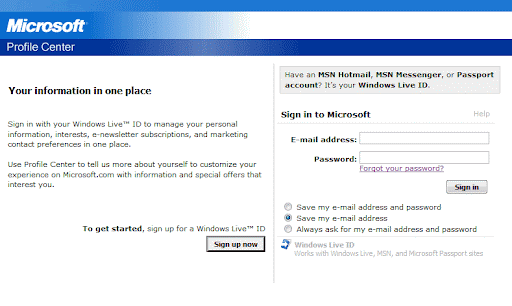
So to begin, I clicked on the unsubscribe link at the bottom of the message. Instead of taking me to a page where I could unsubscribe quickly, I get a login page for Microsoft Passport (see screenshot #1).

Best practice: Don't force your users to log in for an
unsubscribe request. When they click the link in the email, take them straight to the unsubscribe page.


They're expecting me to guess which email address I signed up for this newsletter with (I have several!), and they didn't bother to mention which one it was in the footer of their email.

Best practice: Always put a "You are subscribed as user@email.com" in the footer of your message to make it easier for your reader.

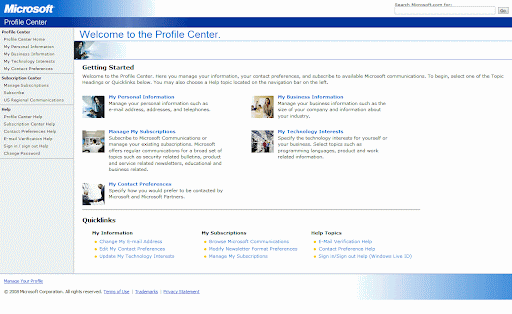
After finally figuring out which email address and which password they were expecting me to put in, I got to a page with a ton of information (see screenshot #2). Where do I click to unsubscribe? Do I choose "My Personal Information" where it says my email address is kept? No, here's a "Manage My Subscriptions" link below that, where it says I can change my subscriptions. That must be it. But wait...right below that it says "My Contact Preferences" where I can change how Microsoft contacts me. This email was from Microsoft. Oh, so confused! And then they add another list of nine quick links at the bottom, which only adds to the confusion.

Best practice: Once you get the user to the unsubscribe page, make it obvious where they're supposed to go to complete the process. They're not clicking the Unsubscribe link because they want to learn more about your company or because they want to change their technology interests. When they click Unsubscribe, they want to unsubscribe.

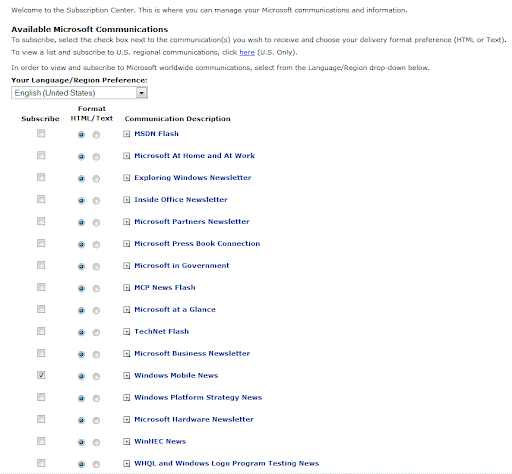
Once I figured out the right choice, it took me to a huge list of at least 30 newsletters and mailing lists, maybe more (view screenshot #3). The list was so long that I had to scroll to see the full thing. I wasn't signed up for most of these newsletters or lists, so I had to search through the list to find the single checkbox that was checked.

Best practice: Show the user what they're subscribed to, quickly and easily. Don't make them guess. Don't make them hunt.

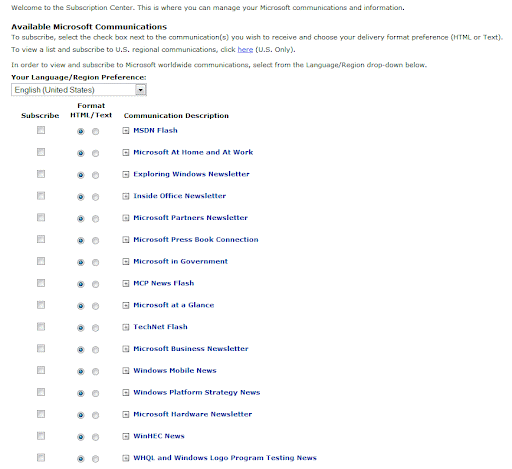
I'm almost there, right? I found the single checkbox that I need to uncheck. Now I'll uncheck it, scroll down to the bottom of the list, and hit the Update button. That should do it, right? Ummm...at least with Microsoft's interface, I'm not sure. If you take a look at screenshot #4, you'll notice it looks remarkably similar to #3. There's no confirmation anywhere saying "Your preferences have been updated" or anything like that.

Best practice: Once the user takes an action on your unsubscribe or newsletter preferences page, make it obvious they've taken an action. Ideally this would be a whole new screen saying "Your preferences have been updated" that would also give them a list of the changes that have taken place, e.g. "You have been unsubscribed from Windows Mobile News." If you can't do that for whatever reason, it's ok to take them back to the same page they just submitted, as long as there's a big, noticeable message that says "Preferences updated" or "You have been unsubscribed." It should be at least 1 1/2 times the size of the next largest font on that page, and it should be in a bright color or some other treatment that makes it impossible to miss.

Best practice: Email confirmation. Send your user an email confirming they've changed their preference or unsubscribed. That way they're sure the action has been processed. (I know some people aren't a fan of the email confirmation for unsubscribes...thinking that it's stupid to send someone an email immediately after they say they don't want any more email from you. Personally when I unsubscribe, I don't mind these messages, and I think it's perfectly acceptable. I'd recommend following one of my favorite rules for communication: Tell them what you're going to do, do it, then tell them what you just did.)

There are certainly many more email unsubscription best practices, and these are just a few. When thinking about your unsubscribe processes, here's what I recommend:

1) Read CAN-SPAM closely (including the most recent rulings from May 2008) and make sure you're complying to the letter of the law.

2) Read CAN-SPAM a second time and make sure you're not just complying with the letter of the law, but also the spirit of the law.

3) Go a step beyond the spirit of the law. Make your unsubscribe process so quick and painless that it's almost pleasant. Legitimate companies comply with the law. Good companies uphold the spirit of the law. And the best companies give the customer an experience so good that they make the customer say WOW!

Google now indexing Flash files, revealing otherwise hidden pages

Back in April I mentioned that Google was beginning to index the "invisible web" by going through forms on websites. Now according to a post in the Google Webmaster Central Blog, Google will begin indexing parts of Adobe Flash files as well, including URLs that appear in Flash files.

This change probably won't have a big effect on websites that have the now-ubiquitous Flash element on the home page. (The current iteration of Intel's and PTC's websites come to mind, but you can see Flash on the home pages of thousands of companies nowadays. It's almost as widespread as the Flash "splash screen" that was in style among web designers for a number of years, until savvy webmasters realized they generally hurt search engine results.) Most of these home page Flash elements aren't purposely trying to hide URLs or information within the file, so you shouldn't have any problem if Google decides to index it and display the results in searches.

The sites that will have problems are the ones using Flash applications for more than just eye candy on their site -- for example, an application that gathers information, then passes the user to a "hidden" URL. If your Flash isn't coded properly, Google could find the URLs and let people into areas you don't want them to get into...at least not without completing some other action. See this post and the associated comments for a good discussion on techniques.

Just like I mentioned in my post in April, a thorough robots.txt file should save you a lot of headaches if you're putting "secret" URLs into Flash.

If you're using Flash, talk to your web developer to make sure this new change isn't going to expose too many of your pages to Google.

Happy 10th birthday, pay-per-click (PPC) advertising -- part 2 of 2

...Continued from yesterday (click here for yesterday's post)


It's Independence Day, the birthday of our country. But in addition to celebrating America's special day, I'm celebrating the 10th birthday of PPC advertising.


GoTo was making constant improvements to its interface and its bidding system. The company had pioneered the "search term suggestion tool" in its early days, to give advertisers an idea of which terms might be relevant to their campaigns. The GoTo tools could also give approximate counts on the number of searches being performed on any given term, which was extremely helpful for determining howmuch traffic you'd get.


Another GoTo innovation involved full disclosure. From the very beginning of GoTo's pay-per-click days, the company made advertisers' bids transparent -- not only to other advertisers, but also to search engine end users. When you did a search on GoTo, you could instantly tell how much an advertiser was bidding per click  because a note like "Cost to advertiser: $0.05" appeared next to each listing.


Despite the dot-com bust in 2000-2001, GoTo kept growing. In October 2001, the company changed its name to Overture. Through established partnerships with Yahoo! and MSN, it was distributing its paid search results to a huge number of Internet users. At one point I remember seeing Overture marketing materials that claimed the percentage reach of their PPC ads. Although I don't remember exact numbers, I recall they were quite impressive.


Although Google -- the current market leader -- launched its AdWords platform in 2000, it was started as a CPM (cost per thousand impressions) product. It wasn't until 2002 that AdWords received a major update, switching to the CPC model it uses today. Google's deal to distribute its ads through AOL was also a major milestone in 2002.  My first experience with AdWords came in 2002, shortly after the company switched to the CPC model. I remember being amazed that it had taken Google two years to make the move from CPM to CPC! This was the beginning of Google AdWords' dominance in the sponsored search market.


Overture was acquired by Yahoo! in 2003. Shortly thereafter, the Overture name was dropped in favor of Yahoo! Search Marketing.


In 2004, Google and Yahoo settled a patent lawsuit. GoTo (later Overture, then Yahoo!) owned a patent related to pay-per-click bidding. Overture sued Google for patent infringement in 2002, and the suit was finally settled out of court in 2004 after Yahoo!'s acquisition of Overture, with Google issuing 2.7 million shares of stock to Yahoo!.


Microsoft, the last of the "big three" to the PPC advertising game, launched MSN adCenter in 2006. I participated in the beta in late 2005 prior to launch, and I wasn't impressed at all. It was quite buggy during beta, with ads not displaying for me and a number of other advertisers. Since then, adCenter has seen a lot of improvements, but it still has only about a 5% market share, compared to Yahoo!'s 15% and Google's 79%.


According to eMarketer, paid search will continue to dominate online advertising for at least the next few years, near a 40% share of all online ad spending. The market is maturing, but it's still the cash cow of the Internet advertising world. The revenue from pay-per-click has fueled Google's growth, and I suspect it will continue to do so.


Happy 10th birthday, sponsored search! It's been a crazy and fun ride. But I have a feeling the ride is just getting started.